Hero Wars Website 2026: The Complete Guide to the Official Platform
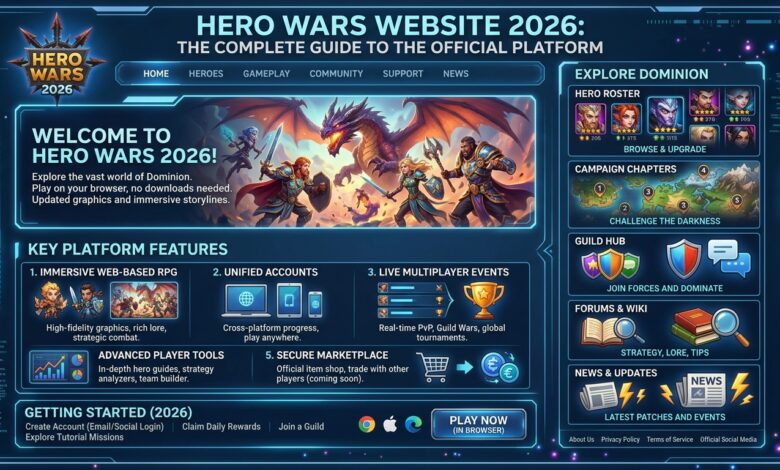
Table of Contents
From Account Creation to Mastering the Browser Experience – Everything You Need to Know
Since its debut in 2016, Hero Wars has become one of the most popular browser-based RPGs in the world. Today, the official website serves as the primary gateway for millions of players seeking to enter the fantasy world of Dominion. This guide covers everything you need to know about playing Hero Wars through your browser – from account setup and login methods to troubleshooting and maximizing your daily rewards.
1. The Hero Wars Ecosystem: Dominion Era vs. Alliance
Before diving into the website experience, it is essential to understand the distinction between the two versions of Hero Wars.
In 2016, Hero Wars made its debut on social media platforms. In 2017, Android and iOS versions were released as replicas of the original game. However, as time progressed, the projects began to diverge, introducing different game modes and heroes while remaining under the same brand name. This caused significant confusion among players who believed Hero Wars was a cross-platform game and were disappointed to discover they could not transfer progress between versions .
To resolve this confusion, the developers undertook a soft rebranding. Today, two distinct games exist:
| Version | Platform | Full Name |
|---|---|---|
| Web/Browser | PC, laptop, desktop browsers | Hero Wars: Dominion Era |
| Mobile | iOS and Android devices | Hero Wars: Alliance |
These are separate games developed by different teams with different mechanics. Progress made in Dominion Era cannot be transferred to Alliance, and vice versa . When you play on the official website, you are playing Dominion Era.
2. Features of the Browser Version
The browser version of Hero Wars offers the original experience that millions of players have enjoyed since 2016. Key features include :
- Dozens of unique heroes – Each with distinct abilities and playstyles
- Hero training and talent progression – Level up your champions and unlock new abilities
- Epic campaigns and adventures – Battle through the story-driven PvE content
- Powerful boss battles – Defeat challenging enemies to claim their strength
- Regular events and rare rewards – Participate in seasonal and limited-time events
- Arena and Grand Arena – Compete against other players in PvP battles
- Guild system – Join forces with allies or found your own community
The browser version is designed primarily for PC and laptop play. For the best experience, the developers recommend playing on a computer rather than a mobile device .
3. Account Creation and Login Methods
Accessing Hero Wars through your browser begins with creating an account. The official website offers several login options .
Available Login Methods
You can sign up for Hero Wars: Dominion Era using :
- Email address and password – Create a unique account with your own credentials
- Google account – Sign in quickly using your Google profile
- Facebook account – Connect through your Facebook profile
The method you choose during signup becomes your default login method. If you sign up with Facebook, you must log in through Facebook to access that account.
How to Log In
- Navigate to the official Hero Wars website
- Click the login button in the top-right corner of the game tab
- Select your preferred login method (email, Google, or Facebook)
- Enter your credentials
- Click to access your account
How to Log Out
- Click the three lines (menu icon) in the upper-right corner of the game tab
- Scroll down
- Choose your preferred option:
- Log out from this device – Ends only your current session
- Log out from all devices – Ends all active sessions across every device
The second option is particularly important if you suspect unauthorized access to your account or if you play on shared computers.
4. Changing Your Login Method
If you signed up with one method but want to switch to another, the process is straightforward .
From Social Media to Email & Password
If you used Facebook or Google but want to switch to email login:
- Confirm the email address you wish to use as your new login method
- Contact the Support team with this email address in your request
- The specialists will review your request and assist with the change
Important note: Once you confirm an email address, you cannot change it later. Additionally, you cannot use the same email address as a login method for more than one game account.
From Email to Social Media
If you signed up with email and password but want to use Facebook or Google:
- Log into your existing account using email and password
- Link your Facebook or Google profile to your game account
- You can then use that social media account to log in going forward
5. Playing on Different Devices
Desktop and Laptop Play
The browser version of Hero Wars is optimized for desktop and laptop computers. A freshly installed, up-to-date browser can help resolve many technical issues, as your current browser might be outdated or have extensions that block access . Common browsers that work well include:
- Google Chrome
- Mozilla Firefox
- Microsoft Edge
- Safari (for Mac users)
Mobile Browser Play
If you wish to play Dominion Era on a mobile device, you can launch the game in most mobile browsers such as Google Chrome or Safari. However, stable performance is not guaranteed, as Hero Wars: Dominion Era was not designed for mobile devices .
Players have reported that playing the browser version on mobile phones can cause issues such as:
- Screen freezing
- Device overheating
- Crashes requiring app restarts
- Video playback problems across other apps
For the best mobile experience, the developers recommend playing Hero Wars: Alliance, the dedicated mobile version.
6. Events and In-Game Activities
The official website regularly hosts special events that offer exclusive rewards. The Spring Rebirth event, held in April 2026, provides a good example of what players can expect .
Event Structure
Events typically feature a set of tasks that players complete for rewards. The Spring Rebirth event involved seven tasks, including:
- Starting or joining adventures
- Logging in during special event periods
- Spending emeralds
- Accumulating VIP points
- Opening chests in the Tower
- Spending energy
Mystery Islands
Many events include a “Mysterious Island” feature – a special map where players spend moves to collect rewards. The Spring Rebirth Island had three major rewards:
- 20,000 emeralds
- 20 Eternal Seeds and 3 Flag Patterns
- 80 Catalysts
Strategic Advice for Events
Based on gameplay experience, here is important advice for events:
- Save resources for better events – Not every event offers good value for your resources. The Spring Rebirth event, for example, was considered underwhelming for free-to-play players
- Avoid unnecessary purchases – Some event bundles are not worth the investment. In the Spring Rebirth event, players were advised not to buy the Easter bundles
- Collect free gifts – Always collect the free gifts offered during events. The Spring Rebirth event included 500 energy, five Easter keys, and 10 soul crystals available for a limited time
Grand Prize Mechanics
In events with egg-opening or similar random reward mechanics, the results may be predetermined. When you refresh the event board, the system assigns each grand prize to a specific numbered position. There is no strategy involved – the outcome is decided the moment you refresh .
7. Community Resources and Support
In-Game Support
For technical issues, account problems, or billing questions, the official support team can be reached through the game. Having key information ready will speed up resolution:
- Your team name
- Your guild name (if applicable)
- Your server number
- Your associated email address
Community Forums
The Hero Wars community maintains active forums and Discord channels where players share strategies, event guides, and troubleshooting advice. These resources are valuable for staying informed about upcoming events and optimal gameplay strategies .
Fan-Supported Guides
Third-party fan sites, such as Hero Wars Central, provide detailed event guides, map walkthroughs, and reward tracking. These resources help players make informed decisions about how to spend resources during events .
8. Account Security Best Practices
Protecting your Hero Wars account is essential, as it represents potentially years of progress and investment.
Recommended Security Measures
- Use a strong, unique password – Do not reuse passwords from other websites
- Log out on shared computers – Always use the “log out from this device” option
- Use “log out from all devices” if needed – This ends all active sessions if you suspect unauthorized access
- Be aware of the email address policy – Once an email is confirmed as a login method, it cannot be changed or used on another account
If Your Account Is Compromised
If you suspect someone else has accessed your account:
- Immediately use “log out from all devices”
- Change your password
- Contact Support with as much account information as possible
- Purchase receipts or screenshots are excellent proof of ownership
9. Common Issues and Troubleshooting
Issue: I see a blank account or lost progress
This is often caused by using the wrong login method. If you signed up with Facebook but are logging in with email, you will see an empty account. Try:
- Logging out completely
- Selecting your original login method (Facebook, Google, or email)
- Logging back in
Issue: Performance problems on mobile browser
The browser version is not optimized for mobile devices. Stable performance is not guaranteed . Solutions include:
- Switch to a desktop or laptop computer
- Install a fresh, updated browser
- Consider playing Hero Wars: Alliance, the dedicated mobile version
Issue: Browser technical problems
A freshly installed browser can help resolve many technical issues. Your current browser might be outdated or have extensions that block access to necessary pages .
10. The 10th Anniversary Celebration (2026)
Hero Wars celebrated its 10th anniversary with special login rewards and content. The anniversary event included enhanced daily rewards with increased Emerald and Soul Stone amounts, along with special community activities.
Conclusion
The official Hero Wars website remains the primary gateway to the Dominion Era experience. With multiple login methods, regular events, and a dedicated community, the browser version offers a rich RPG experience for players worldwide.
Remember the key distinctions between the two versions: Dominion Era for browser, Alliance for mobile – progress does not transfer between them. Choose the platform that suits your play style, secure your account properly, and enjoy the epic battles that await in the world of Dominion.